Overview
Webhooks allow you to receive real-time notifications when events occur on your Meter network. When an alert triggers, Meter sends a webhook to your configured endpoint with details about the event.
Use webhooks to integrate Meter alerts with your existing monitoring systems, ticketing platforms, or custom automation workflows.
Prerequisites
- Dashboard access with Admin or Network Admin permissions
- A publicly accessible HTTPS endpoint to receive webhook payloads
- (Optional) A secret key for payload verification
Use cases
- Forward network alerts to a ticketing system (ServiceNow, Jira, etc.)
- Trigger automated remediation workflows
- Aggregate alerts in a centralized monitoring platform
- Build custom dashboards and reporting tools
- Send notifications to chat platforms (beyond Slack integration)
Configuring webhooks
Accessing webhook settings
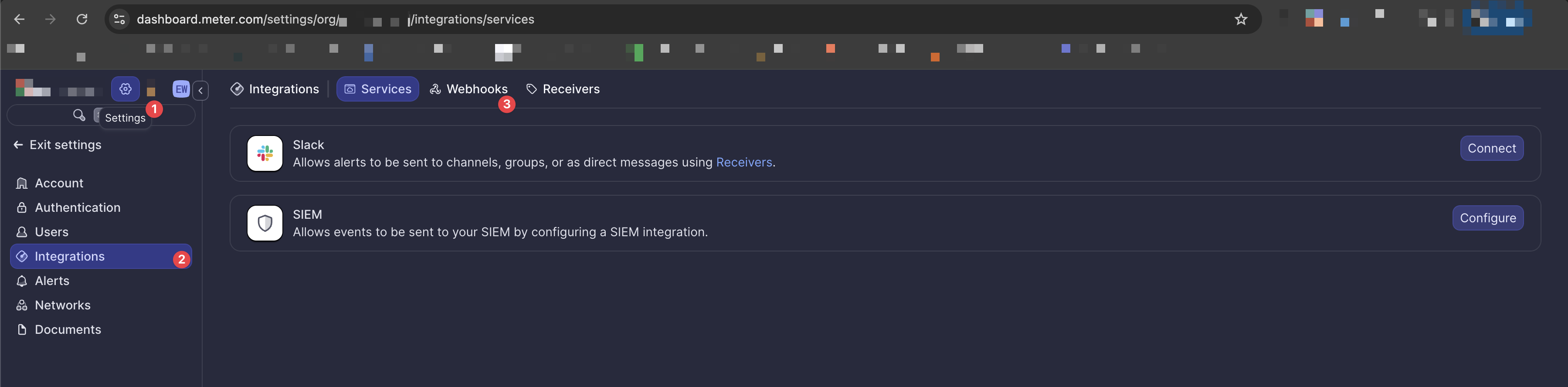
- Navigate to Settings in the Dashboard sidebar
- Select Integrations
- Click the Webhooks tab
Adding a webhook
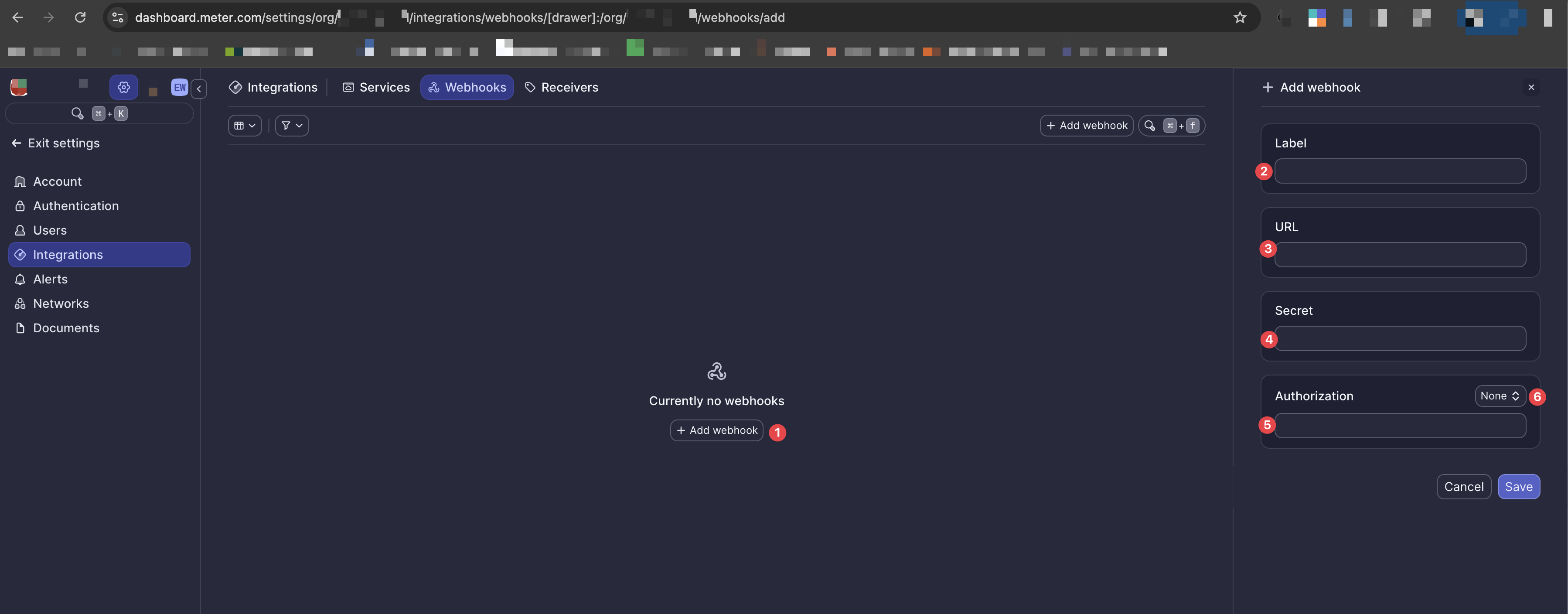
- Click + Add webhook
- Enter a Label - a descriptive name for this webhook (e.g., "Production Alerts")
- Enter the URL - the HTTPS endpoint that will receive webhook payloads
- (Optional) Enter a Secret - a shared secret for payload verification
- Select an Authorization method
- Choose from the dropdown: None, Basic, or Bearer
- Click Save to create the webhook
Authorization options
| Option | Description |
|---|---|
| None | No authentication header is sent with requests |
| Basic | Sends an Authorization: Basic <credentials> header |
| Bearer | Sends an Authorization: Bearer <token> header |
Webhook payload format
All webhook payloads follow a consistent structure with two main objects:
{
  "metadata": {
    "alert_name": "ALERT_DEVICE_OFFLINE",
    "network_name": "Main Office",
    "timestamp": "2026-01-23T21:40:03Z"
  },
  "data": {
    // Alert-specific data
  }
}
Metadata fields
| Field | Type | Description |
|---|---|---|
alert_name | string | The type of alert that triggered (e.g., "ALERT_DEVICE_OFFLINE", "ALERT_WAN_DOWN") |
network_name | string | The label of the network where the event occurred |
timestamp | string | ISO 8601 timestamp of when the event occurred |
Data fields
The data object contains alert-specific information. See the Alert events reference for detailed payload schemas for each alert type.
Troubleshooting
Related resources
- Alert events reference - Detailed payload schemas for all alert types
- How to configure alerts - Set up which alerts trigger webhooks
- Slack integration - Alternative for sending alerts to Slack
Need help?
If you run into any issues or have questions, please reach out to our Support Engineering team by opening a ticket via the Dashboard: https://dashboard.meter.com/support
Last updated by Meter Support Engineering on 01/23/2026