RADIUS server unreachable
Overview
The RADIUS server unreachable alert triggers when the configured RADIUS server cannot be contacted. This may prevent users from authenticating to 802.1X or WPA2-Enterprise networks.
Prerequisites
- Dashboard access with Admin or Network Admin permissions
- Alert receivers configured
- RADIUS profiles configured
Configuring the alert
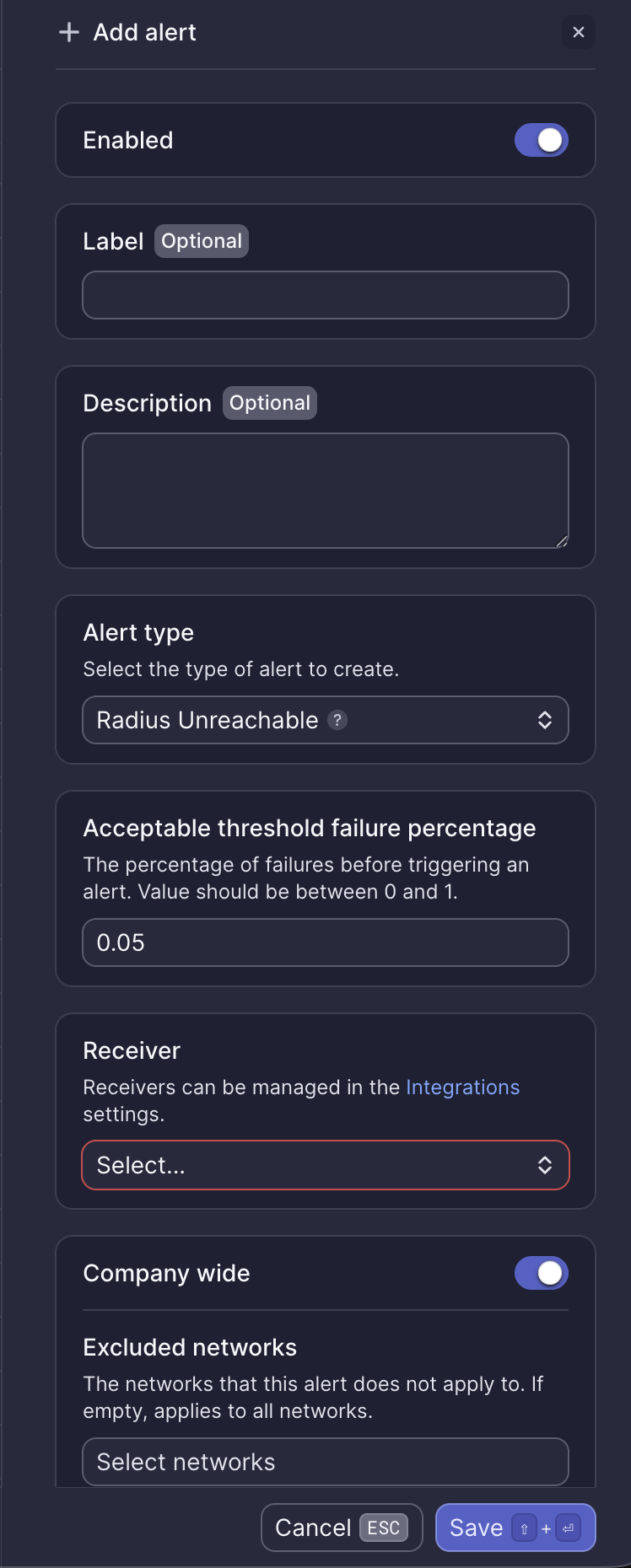
Configuration fields
| Field | Required | Description |
|---|---|---|
| Enabled | Yes | Toggle to activate or deactivate the alert (default: on) |
| Label | No | Custom name for this alert instance |
| Description | No | Additional notes about this alert |
| Alert type | Yes | Select "Radius Unreachable" |
| Acceptable threshold failure percentage | Yes | Percentage of failures before triggering an alert. Value between 0 and 1 (default: 0.05 = 5%) |
| Receiver | Yes | Select from configured receivers |
| Company wide | Yes | Apply to all networks or select specific networks |
| Excluded networks | No | Networks to exclude when Company wide is enabled |
Webhook event
This alert corresponds to the ALERT_RADIUS_PROFILE_UNREACHABLE webhook event. See RADIUS profile unreachable webhook payload for integration details.
What to do when you receive this alert
- Verify the RADIUS server is running and accessible
- Check network connectivity between Meter devices and the RADIUS server
- Verify firewall rules allow RADIUS traffic (typically UDP port 1812)
- Review RADIUS server logs for authentication errors
- Contact Meter Support if the issue persists
Related resources
Need help?
If you run into any issues or have questions, please reach out to our Support Engineering team by opening a ticket via the Dashboard: https://dashboard.meter.com/support
Last updated by Meter Support Engineering on 01/23/2026