Overview
The WAN status change alert indicates a failover or failback between active ISP connections based on your WAN settings. During a WAN status change, network traffic will experience a short drop in connectivity.
Prerequisites
- Dashboard access with Admin or Network Admin permissions
- Alert receivers configured
Configuring the alert
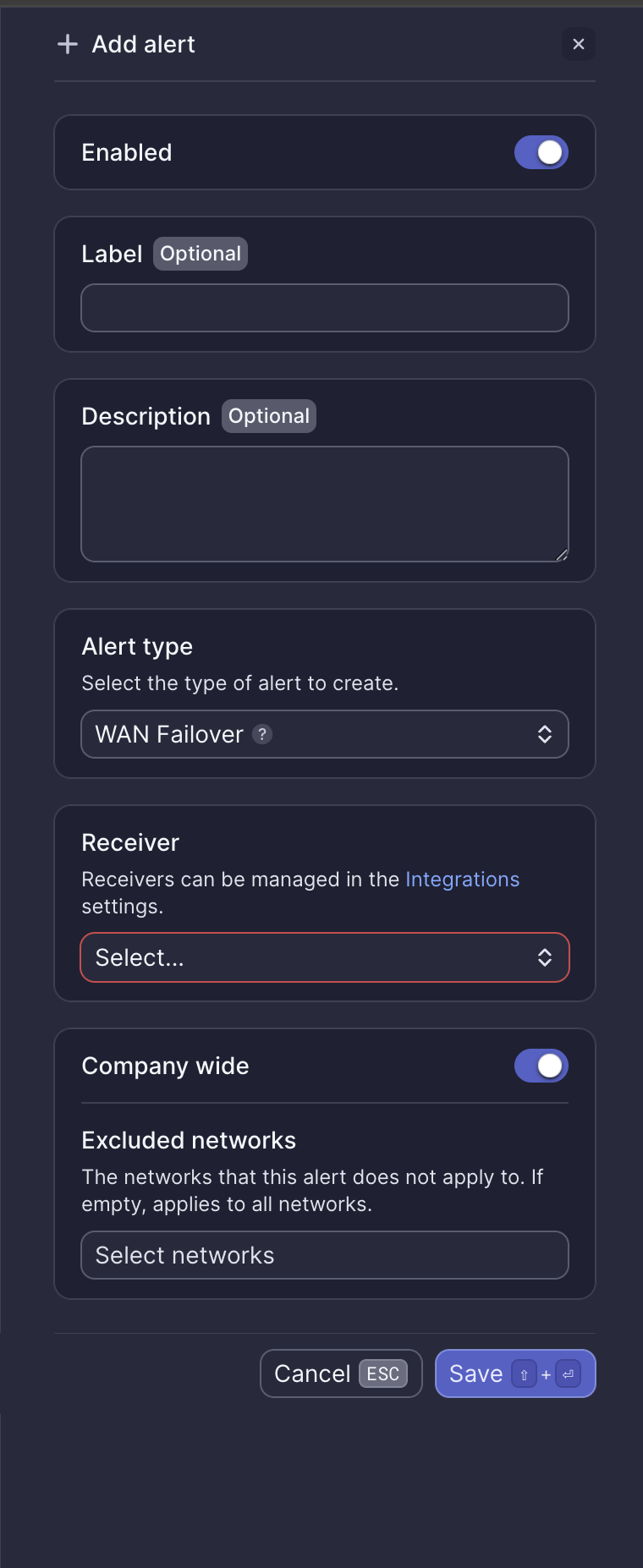
Configuration fields
| Field | Required | Description |
|---|---|---|
| Enabled | Yes | Toggle to activate or deactivate the alert (default: on) |
| Label | No | Custom name for this alert instance |
| Description | No | Additional notes about this alert |
| Alert type | Yes | Select "WAN Failover" |
| Receiver | Yes | Select from configured receivers |
| Company wide | Yes | Apply to all networks or select specific networks |
| Excluded networks | No | Networks to exclude when Company wide is enabled |
Webhook event
This alert corresponds to the ALERT_WAN_FAILOVER webhook event. See WAN failover webhook payload for integration details.
What to do when you receive this alert
If WAN status change alerts are infrequent
No action is required. This is redundancy working as expected.
If WAN status change alerts are frequent
If failovers are consistently occurring (several times in one day), the ISP may be experiencing a partial outage, or WAN settings may need to be adjusted. Contact Meter Support for guidance.
If a failback never occurs
This means the ISP never recovered, and the network is continuing to use the backup connection. Follow the steps in WAN down to resolve ISP issues.
Need help?
If you run into any issues or have questions, please reach out to our Support Engineering team by opening a ticket via the Dashboard: https://dashboard.meter.com/support
Last updated by Meter Support Engineering on 01/23/2026