Overview
An ISP outage alert triggers when an ISP connection is below 20% quality for more than five minutes. Quality is a measurement of returned successful pings from well-known hosts. This value is displayed on the Network Insights page.
Prerequisites
- Dashboard access with Admin or Network Admin permissions
- Alert receivers configured
Configuring the alert
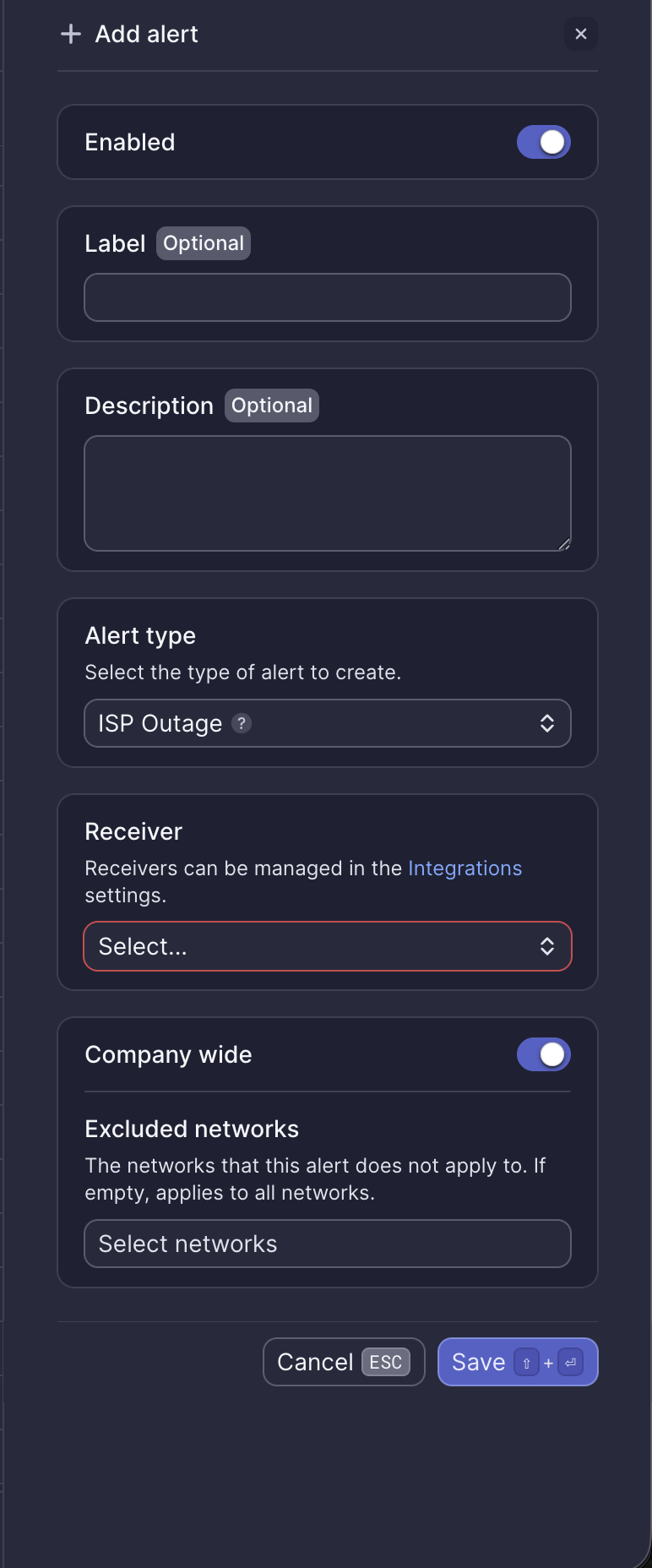
Configuration fields
| Field | Required | Description |
|---|---|---|
| Enabled | Yes | Toggle to activate or deactivate the alert (default: on) |
| Label | No | Custom name for this alert instance |
| Description | No | Additional notes about this alert |
| Alert type | Yes | Select "ISP Outage" |
| Receiver | Yes | Select from configured receivers |
| Company wide | Yes | Apply to all networks or select specific networks |
| Excluded networks | No | Networks to exclude when Company wide is enabled |
Webhook event
This alert corresponds to the ALERT_ISP_OUTAGE webhook event. See ISP outage webhook payload for integration details.
What to do when you receive this alert
Meter Support will proactively reach out shortly after this alert fires. If you haven't received an email from Support, open a ticket via the Dashboard.
Reboot ISP equipment
If possible, reboot the ISP equipment. Occasionally, this can be done remotely by the ISP. If a remote reboot isn't possible, the equipment must be physically power cycled.
If you need assistance identifying ISP equipment, contact Meter Support.
Contact the ISP
If Meter handles your ISP billing and support, we will reach out to the ISP on your behalf and provide updates.
Need help?
If you run into any issues or have questions, please reach out to our Support Engineering team by opening a ticket via the Dashboard: https://dashboard.meter.com/support
Last updated by Meter Support Engineering on 01/23/2026