Rogue access point
Overview
The rogue access point alert triggers when WIDS detects an unauthorized access point connected to your wired network. Rogue APs can create security vulnerabilities by bypassing network security controls.
Prerequisites
- Dashboard access with Admin or Network Admin permissions
- Alert receivers configured
- WIDS enabled
Configuring the alert
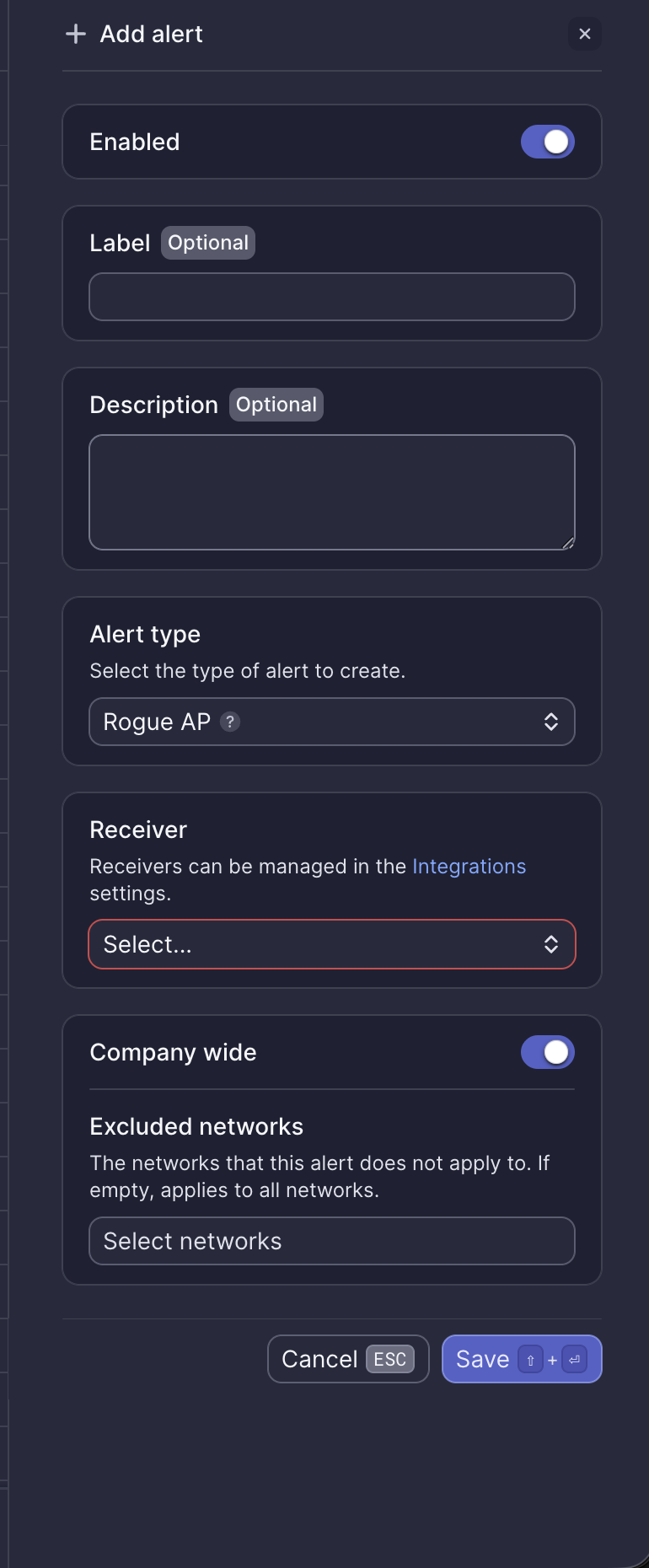
Configuration fields
| Field | Required | Description |
|---|---|---|
| Enabled | Yes | Toggle to activate or deactivate the alert (default: on) |
| Label | No | Custom name for this alert instance |
| Description | No | Additional notes about this alert |
| Alert type | Yes | Select "Rogue AP" |
| Receiver | Yes | Select from configured receivers |
| Company wide | Yes | Apply to all networks or select specific networks |
| Excluded networks | No | Networks to exclude when Company wide is enabled |
Webhook event
This alert corresponds to the ALERT_ROGUE_AP_DETECTED webhook event. See Rogue access point webhook payload for integration details.
What to do when you receive this alert
- Review the alert details to identify the rogue AP's MAC address and location
- Determine if this is an authorized device (e.g., a known wireless printer)
- If unauthorized, locate and disconnect the device from the network
- Consider blocking the device's MAC address at the switch port level
- Contact Meter Support for assistance with investigation
Related resources
Need help?
If you run into any issues or have questions, please reach out to our Support Engineering team by opening a ticket via the Dashboard: https://dashboard.meter.com/support
Last updated by Meter Support Engineering on 01/23/2026