Overview
The radar hit alert triggers when an access point detects radar interference on a DFS channel and must switch to a different channel. This is a regulatory requirement to avoid interfering with weather radar and other systems.
Prerequisites
- Dashboard access with Admin or Network Admin permissions
- Alert receivers configured
Configuring the alert
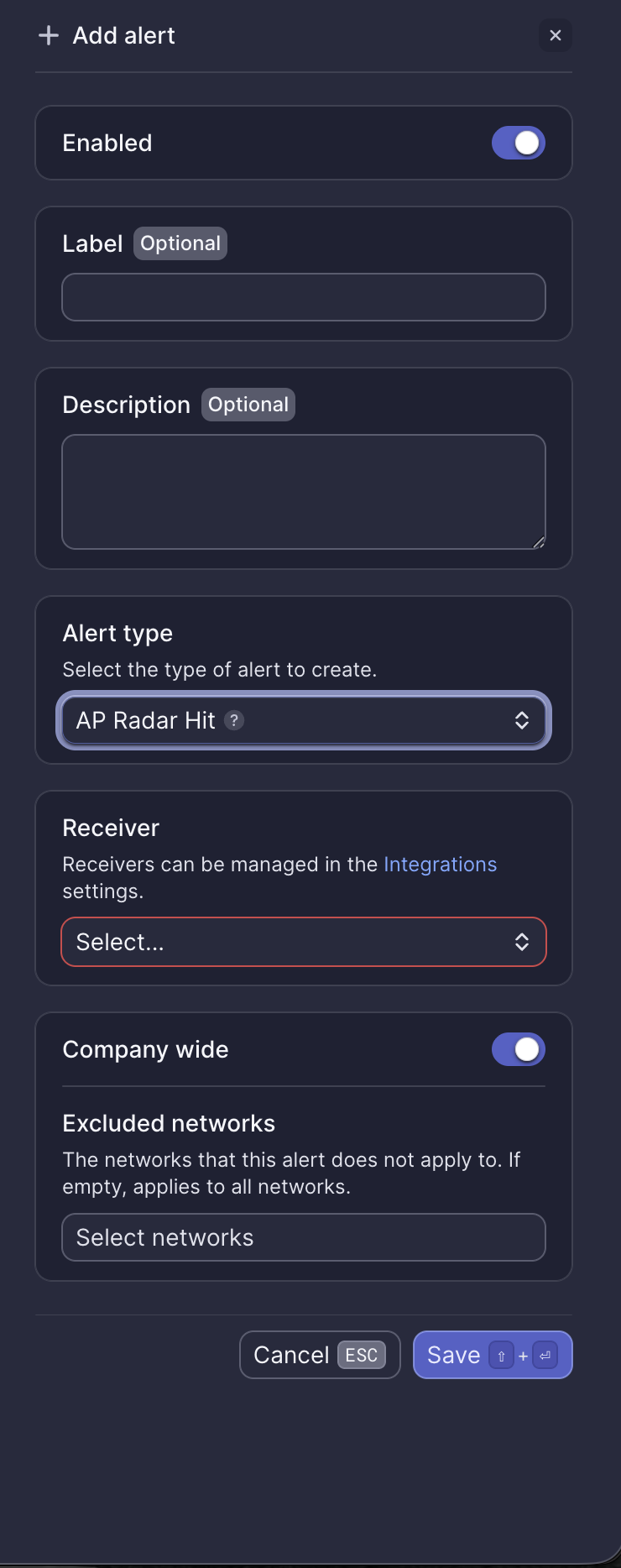
Configuration fields
| Field | Required | Description |
|---|---|---|
| Enabled | Yes | Toggle to activate or deactivate the alert (default: on) |
| Label | No | Custom name for this alert instance |
| Description | No | Additional notes about this alert |
| Alert type | Yes | Select "AP Radar Hit" |
| Receiver | Yes | Select from configured receivers |
| Company wide | Yes | Apply to all networks or select specific networks |
| Excluded networks | No | Networks to exclude when Company wide is enabled |
Webhook event
This alert corresponds to the ALERT_AP_RADAR_HIT webhook event. See Radar hit webhook payload for integration details.
What to do when you receive this alert
Radar detection events are normal in environments near airports, weather stations, or military installations. When radar is detected:
- The AP automatically vacates the DFS channel
- The AP selects a new non-DFS or clear DFS channel
- Clients briefly reconnect to the new channel
If radar hits are frequent and causing disruption, consider configuring APs to use non-DFS channels only.
Need help?
If you run into any issues or have questions, please reach out to our Support Engineering team by opening a ticket via the Dashboard: https://dashboard.meter.com/support
Last updated by Meter Support Engineering on 01/23/2026